


EZPass Illinois (branded as I-PASS) is the official electronic toll system managed by the Illinois State Toll Highway Authority (ISTHA). This system lets drivers move through toll plazas without stopping, paying automatically through a small transponder mounted on the windshield. I-PASS works across nearly 294 miles of Illinois toll roads, including the Jane Addams Memorial Tollway (I-90), Tri-State Tollway (I-94/I-294/I-80), Reagan Memorial Tollway (I-88), Veterans Memorial Tollway (I-355), and Illinois Route 390.
I-PASS also links to the E-ZPass network covering 19 states, making it valid from Indiana to New York. With I-PASS, drivers save up to 50% on tolls compared to the Pay By Plate camera rate. This guide covers every action you need: logging in, creating an account, buying and activating a transponder, placing the sticker, handling unpaid tolls, using the mobile app, finding customer service centers, and more.
What Is EZPass Illinois (I-PASS)?
EZPass Illinois is the same product as I-PASS. The Illinois Tollway uses the I-PASS name, but many drivers search for “EZPass Illinois” because E-ZPass is the national brand. I-PASS transponders work on all E-ZPass toll roads across 19 states, including the Indiana Toll Road, Ohio Turnpike, and New York Thruway. The system runs through RFID (radio frequency identification) chips inside the transponder. As a vehicle passes under a toll gantry, the reader scans the chip and deducts the toll from the prepaid account balance. No stopping. No cash. No paper tickets.
Who Runs I-PASS?
The Illinois State Toll Highway Authority (ISTHA) operates the system. ISTHA oversees construction, maintenance, toll rates, customer service, and the online portal. ISTHA also partners with toll agencies in other states through the E-ZPass Interagency Group (IAG), so one I-PASS tag covers drivers across most of the Northeast, Midwest, and parts of the South.
Why I-PASS Saves Money
Drivers without I-PASS pay the Pay By Plate rate, which is double the I-PASS rate for passenger cars. For example, on I-90 at South Beloit, a passenger car pays $0.95 with I-PASS but $1.90 through Pay By Plate. Across a full commute, this savings adds up fast. Commercial vehicles also receive lower rates with I-PASS.
EZPass Illinois Account Login Steps
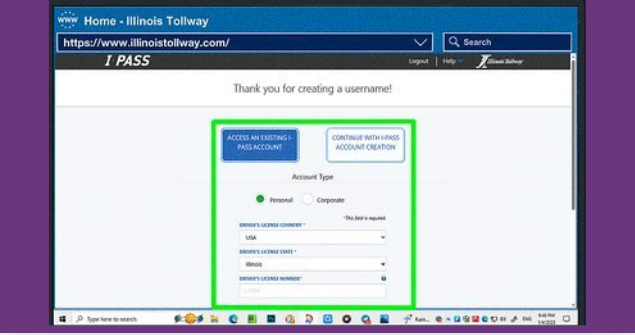
Logging into your I-PASS account takes less than two minutes when you know the steps. Use the official portal at agency.illinoistollway.com or open the Illinois Tollway mobile app. Bookmark the page to avoid phishing sites that copy the I-PASS login screen.
Step 1: Open the Official Login Page
Type agency.illinoistollway.com into your browser address bar. Do not click login links from emails or search ads. Phishing sites mimic real login pages to steal usernames and passwords. The real I-PASS login page shows the Illinois Tollway Authority seal and a secure HTTPS connection. On the mobile app, tap the “Login” button on the home screen. The app version is faster for checking balances, paying tolls, and updating vehicles while on the road.
Step 2: Enter Username and Password
Type your username (usually your email) in the first field. Type your password in the second field. Passwords are case-sensitive. If you set up the account with your license plate, you can also use your plate number in place of an email. Click or tap the “Login” button. A successful login lands you on the dashboard showing your balance, recent tolls, registered vehicles, and account status.
Step 3: Use the Right Login Page for Your Account Type
Personal I-PASS accounts use one login. Commercial I-PASS accounts use the same portal but display business tools like fleet reports and multi-vehicle management. Make sure you log into the correct account to avoid confusion between personal and business balances. If you have both a personal and commercial I-PASS, the system keeps them separate. Each account needs its own email and password.
EZPass Illinois Login Problems
Login problems block access to your account, which can delay bill payments or cause toll violations. The most common issues include forgotten passwords, locked accounts, expired sessions, browser errors, and server downtime. Each problem has a simple fix.
Forgot Your I-PASS Password
Click the “Forgot Password” link below the login button. Enter your registered email. The system sends a reset link within minutes. Check the spam folder if the email does not appear in your inbox.
Open the reset link, type a new password, and confirm. Use 12 or more characters with a mix of letters, numbers, and symbols. Never reuse passwords from other accounts.
Forgot Your I-PASS Username
Click the “Forgot Username” link. Enter the email linked to your account. The system sends your username to that email. If you no longer use that email, call customer service at 1-800-UC-IPASS (1-800-824-7277) to verify identity and recover the username.
Locked Account After Too Many Login Attempts
After five failed password attempts, the system locks the account for 15 minutes. Wait 15 minutes, then try again with the correct password. If the lock persists, reset the password through the “Forgot Password” link or call customer support.
Browser Compatibility Problems
Old browsers block login scripts. Use Chrome, Firefox, Safari, or Edge with the latest updates. Clear the browser cache and cookies before retrying. Disable browser extensions that block scripts, especially ad blockers and privacy tools.
Expired Login Session
Sessions expire after 20 minutes of inactivity for security. Re-enter your credentials to refresh the session. Active users do not face this issue. Mobile app users stay logged in until they manually log out.
Internet Connection Problems
Slow or unstable internet prevents the login form from loading. Test your speed at fast.com. Switch to mobile data or a stronger Wi-Fi signal if the page fails to load.
Website or Server Downtime
Scheduled maintenance can take the login page offline for short windows. The Illinois Tollway posts outage alerts on its X (Twitter) account. Try again later or use the mobile app, which often stays active during web maintenance.
I-PASS Account Security Tips
Protecting your I-PASS account prevents unauthorized toll charges and stops scammers from stealing your stored payment data. A few simple habits keep the account locked down.
Use a Strong, Unique Password
Pick a password with 12 or more characters, mixing upper and lower case letters, numbers, and symbols. Avoid dictionary words, birthdays, or names. A password manager like Bitwarden, 1Password, or LastPass stores strong passwords safely.
Change the password every six months. Update it through the “Profile” section after logging in.
Log Out After Each Session on Shared Devices
Public computers at libraries, hotels, and coffee shops keep sessions open. Always click “Logout” before closing the browser. On your phone, enable auto-lock and biometric login to prevent access if the device is lost or stolen.
Use Secure Networks Only
Public Wi-Fi at airports and cafes exposes login data to hackers. Use your phone’s mobile data or a trusted home network when accessing I-PASS. A VPN adds another layer of encryption for travelers.
Watch for Phishing Emails and Texts
Scammers send fake I-PASS emails claiming a violation, unpaid toll, or account suspension. The message includes a link to a fake login page designed to steal credentials. Real I-PASS emails come from addresses ending in @illinoistollway.com. Never click links in suspicious messages. Go directly to illinoistollway.com instead.
Activate Two-Factor Authentication
Two-factor authentication (2FA) adds a text or app code to the login process. Even if a thief steals your password, they cannot log in without the second code. Enable 2FA in the “Security” section of your account profile.
How to Create an EZPass Illinois Account
Opening an I-PASS account takes about 10 minutes online. You need personal details, vehicle information, and a payment method. The system creates an account number tied to your transponder. The account holds your prepaid balance and stores payment methods for auto-replenishment.
Information You Need Before Signing Up
Gather these items before starting the signup form:
- Full name, phone number, and email address
- Mailing address (for shipping the transponder)
- License plate number, vehicle make, model, and year
- Credit card or bank account for the initial deposit and auto-replenishment
- Driver’s license number (optional for identity verification)
Step 1: Visit the Official I-PASS Signup Page
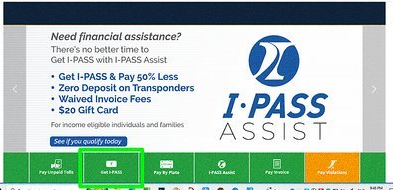
Go to illinoistollway.com and click “Get I-PASS” or “Sign Up.” The signup form asks for personal details, vehicle details, and payment information. Select “Personal Account” for regular drivers. Choose “Commercial Account” for fleet vehicles and business trucks.
Step 2: Fill in Personal Details
Enter your name, email, phone, and mailing address. Double-check the email; a typo blocks the verification step later. Use a current address because the system mails the transponder to this location.
Step 3: Add Vehicle Information
Type the license plate number exactly as printed. Select the make, model, and year from the dropdown menus. Vehicles with two axles and four tires fall into the passenger car category. Trucks, trailers, and motorcycles need special vehicle classes, which the system prompts you to select.
Step 4: Set Up Login Credentials
Pick a username (often the email) and a strong password. Choose security questions from the dropdown list. Save these answers somewhere safe, as they help recover the account if you lose access.
Step 5: Activate Through Email Verification
The system emails a verification link after signup. Open the link to confirm the email and activate the account. Without verification, you cannot log in or order a transponder. If the email never arrives, check the spam folder or click “Resend Verification” on the login page.
Step 6: Add a Payment Method and Initial Balance
Link a credit card, debit card, or bank account. Load at least $20 as the starting balance. The $10 transponder deposit is refundable when you return the device. Set auto-replenishment to refill the account automatically when the balance drops below a set limit (usually $10).
What If the Signup Form Fails?
Browser errors during signup usually come from cached data. Clear the cache, switch browsers, or try the mobile app. If the verification email never arrives, the email address on file may be wrong. Call 1-800-UC-IPASS to fix the email.
Buying a New I-PASS Transponder in Illinois
You can buy an I-PASS transponder online, in person, or by phone. The $10 deposit is refundable. The transponder arrives as either a sticker tag (mounted on the windshield) or a hard case (clipped to the visor). Stickers work for most passenger cars. Hard cases fit commercial vehicles or drivers who switch transponders between cars.
Buying an I-PASS Transponder Online
Log into your I-PASS account and select “Order Transponder.” Pick the sticker or hard-case version. Pay the $10 deposit plus the initial balance ($20 minimum). The transponder ships in 7 to 10 business days. The shipment includes mounting instructions.
Buying an I-PASS Transponder in Person
I-PASS transponders are available at retail locations across Illinois, including:
- Jewel-Osco grocery stores
- Road Ranger travel centers
- CVS pharmacies (select locations)
- Illinois Tollway Customer Service Centers
- Tollway oases (rest stops on I-90, I-88, and I-294)
Bring your driver’s license, vehicle registration, and a credit card. Staff link the transponder to your account on the spot. Some retail locations sell transponders but do not link them. In that case, link the transponder later through your online account using the serial number.
Buying an I-PASS Transponder by Phone or Mail
Call 1-800-UC-IPASS to order by phone. Provide your account details and vehicle information. The transponder ships in 7 to 10 business days. Mail orders take longer and require a check or money order. Phone orders are faster and more secure than mail orders.
I-PASS Transponder Types and Costs
- Sticker tag: $10 deposit (refundable), free replacement under warranty
- Hard-case transponder: $10 deposit (refundable), swappable between vehicles
- Motorcycle transponder: $10 deposit (refundable), weatherproof design
- Commercial transponder: $10 deposit (refundable), supports fleet vehicles
Registering and Activating Your I-PASS Transponder
A transponder only works after activation. Activation links the device’s serial number to your account and registered vehicle. Without activation, the toll gantry cannot identify the driver or charge the right account.
Online Activation Through Your I-PASS Account
Log into agency.illinoistollway.com. Click “Manage Transponders.” Enter the serial number printed on the back of the transponder or on the packaging. Select the vehicle to link. Submit the form. The system confirms activation within seconds.
Activating by Phone
Call 1-800-UC-IPASS. Provide the transponder serial number and the vehicle’s license plate. Staff activate the device over the phone in a few minutes. Phone activation works for retail-bought transponders and starter kits.
Activating in Person
Visit an Illinois Tollway Customer Service Center. Bring the transponder, your account details, and the vehicle’s license plate. Staff activate and test the device on the spot. In-person activation is best for drivers who want face-to-face help.
Activation Errors and Fixes
Invalid serial number: Check for typos. The letter “O” and the number “0” look similar. Hard-case transponders show the serial number inside the battery compartment. Vehicle not found: Add the vehicle to your account before activating the transponder. The system cannot link a transponder to a vehicle that does not exist in the profile. Transponder already linked: A transponder can only link to one vehicle at a time. Remove the transponder from the old vehicle before linking it to a new one.
Tag not reading at toll plaza: Check the windshield placement. Tinted areas and heated windshields block the RFID signal. Move the sticker or hard case to a clear section of glass.
I-PASS Sticker Placement on Your Windshield
Correct placement ensures the RFID reader at every toll gantry picks up the signal. Wrong placement causes missed tolls and Pay By Plate charges. The sticker goes in one specific spot on the windshield, away from tint and metal.
Where to Place the I-PASS Sticker
The sticker goes about 2 inches below the rearview mirror mount or 2 inches to the right of the mirror. Place it in a clear area of glass, away from:
- Window tint strips (the dark band at the top of some windshields)
- Heated windshield wires
- Metal components in the glass
- Rain sensors near the mirror
Trucks, RVs, and vans with high windshields need to place the sticker lower, usually 4 to 6 inches below the mirror mount.
Preparing the Windshield Before Placement
Clean the area with rubbing alcohol and a microfiber cloth. Let the glass dry for one minute. Dirt, grease, and water prevent the adhesive from sticking. A clean surface holds the sticker through rain, snow, and car washes for years.
Applying the Sticker Steps
- Peel the backing off the sticker without touching the adhesive
- Hold the sticker 2 inches below the rearview mirror
- Press the sticker firmly onto the glass for 10 seconds
- Run your finger across the surface to remove air bubbles
- Do not move the sticker once it touches the glass
The adhesive sets in 24 hours. Avoid heavy rain or car washes for the first day. If the sticker peels off, request a replacement through your I-PASS account. Do not try to reapply a used sticker; the adhesive weakens after the first placement.
Pay By Plate and Unpaid Tolls in Illinois
Pay By Plate lets drivers without I-PASS pay tolls through license plate cameras. The cameras photograph the plate at the toll gantry. The system sends an invoice by mail or allows online payment within 14 days. Missing the 14-day window leads to violations and fees.
How Pay By Plate Works
When a vehicle without a working transponder drives through a toll plaza, the camera captures the license plate. The system matches the plate to the registered owner using Illinois Secretary of State records. The owner receives an invoice in the mail with a link to pay online at illinoistollway.com.
Pay By Plate costs more than I-PASS for the same toll. The extra cost covers billing and processing fees. Drivers who use Pay By Plate regularly save money by switching to I-PASS.
Checking Unpaid Tolls
Go to agency.illinoistollway.com/unpaid-tolls. Enter the license plate number. The system shows all unpaid tolls tied to that plate. Each toll lists the date, location, amount due, and the deadline (usually 14 days after the toll).
Pay unpaid tolls online with a credit card, debit card, or bank account. Pay before the deadline to avoid violation fees.
Consequences of Unpaid Tolls
Late tolls add $20 to $50 in violation fees per missed toll. After 30 days, unpaid tolls escalate to a collections agency. After 90 days, the Illinois Tollway can place a hold on the vehicle’s registration, blocking renewal until the balance is paid.
Unpaid tolls also hurt credit scores when sent to collections. Pay tolls on time to avoid these costs.
Disputing an Incorrect Toll
If a toll charge is wrong (wrong vehicle, wrong location, wrong amount), dispute it through the “Dispute a Toll” link on the unpaid tolls page. Submit proof, such as a photo of your I-PASS receipt or documentation showing the vehicle was elsewhere. The Tollway reviews disputes within 30 days.
I-PASS Payments and Account Funding Options
Funding your I-PASS account keeps tolls flowing without interruption. Several options exist for adding money, including auto-replenishment, online payments, phone payments, and in-person payments.
Automatic Replenishment (Auto-Replenish)
Auto-replenishment adds funds to your account automatically when the balance drops below a set limit. Most drivers set the threshold at $10 and the refill amount at $20 to $50. The system charges the linked credit card or bank account without any action from the driver.
Auto-replenishment prevents missed tolls caused by empty balances. It also avoids the $20 to $50 penalty fees tied to unpaid tolls. Enable auto-replenishment in the “Payment” section of your account profile.
Online and Mobile App Payments
Log into agency.illinoistollway.com or open the mobile app. Click “Add Funds” or “Make a Payment.” Enter the amount ($20 minimum). Pay with a credit card, debit card, or bank account. Funds post to the account instantly.
The mobile app shows real-time toll deductions and balance updates. Drivers who travel often check the app daily to track spending.
Phone Payments
Call 1-800-UC-IPASS. Provide your account number and payment details. Staff add funds over the phone. A small processing fee may apply for phone payments from a representative.
In-Person Payments
Pay at any Illinois Tollway Customer Service Center or tollway oasis. Bring your account number or transponder. Staff accept cash, checks, credit cards, and debit cards. In-person payments post to the account before you leave.
I-PASS Fees and Costs
- Transponder deposit: $10 (refundable when returned)
- Initial balance: $20 minimum
- Auto-replenishment threshold: $10 (recommended)
- Replenishment amount: $20, $30, $40, or $50 (your choice)
- Monthly account fee: $0 (no fee for personal accounts)
- Late toll penalty: $20 to $50 per toll
- Collections fee: $25 or more depending on balance owed
Illinois Toll Rates, Discounts, and Vehicle Categories
Illinois toll rates depend on the vehicle type, toll plaza, time of day, and payment method (I-PASS vs. Pay By Plate). I-PASS users always pay less than Pay By Plate users. Commercial vehicles have different rates than passenger cars.
Vehicle Categories
The Illinois Tollway sorts vehicles into four tiers based on axles and weight:
- Tier 1: Passenger cars, SUVs, motorcycles, pickup trucks (2 axles, 4 tires)
- Tier 2: Small commercial vehicles (2 axles, 6 tires)
- Tier 3: Medium trucks and RVs (3 to 4 axles)
- Tier 4: Large trucks and tractor-trailers (5 or more axles)
Selecting the right tier matters. Driving a Tier 3 vehicle with a Tier 1 I-PASS tag results in underpayment and possible violations.
Toll Rates by Tollway (2026)
| Tollway | I-PASS Rate (Passenger) | Pay By Plate Rate (Passenger) |
|---|---|---|
| Jane Addams Memorial (I-90) – South Beloit | $0.95 | $1.90 |
| Jane Addams Memorial (I-90) – Belvidere | $1.50 | $3.00 |
| Tri-State (I-94/I-294/I-80) – Waukegan | $1.40 | $2.80 |
| Tri-State (I-294) – Cermak Road | $0.75 | $1.50 |
| Reagan Memorial (I-88) – DeKalb | $1.80 | $3.60 |
| Reagan Memorial (I-88) – Aurora | $0.75 | $1.50 |
| Veterans Memorial (I-355) – Spring Creek | $1.90 | $3.80 |
| Veterans Memorial (I-355) – Boughton Road | $0.95 | $1.90 |
| Illinois Route 390 – Plum Grove Road | $0.60 | $1.20 |
Rates update every few years. Check illinoistollway.com for the latest toll schedule.
I-PASS Discount Program
Every I-PASS user gets a 50% discount compared to Pay By Plate. The discount applies to all tollways, all vehicle types, and all hours. There is no separate application. The savings happen automatically when the I-PASS tag scans at the toll gantry.
I-PASS Assist Program for Income-Eligible Drivers
The I-PASS Assist Program helps income-eligible drivers access the 50% discount with no upfront deposit. Qualifying applicants receive a free transponder and a reduced initial balance requirement ($10 instead of $20). Apply through the Illinois Tollway website with proof of income, such as tax returns or pay stubs.
Approval takes 30 to 60 days. Approved applicants keep the same 50% discount as standard I-PASS users.
Using I-PASS in Rental Cars
I-PASS works in rental cars through the same transponder or through Pay By Plate. Rental car companies often charge $15 or more per week for their toll programs. Using your I-PASS in a rental avoids these fees.
Adding a Rental Car Plate to Your I-PASS Account
Log into your I-PASS account. Click “Manage Vehicles.” Add the rental car’s license plate, state, make, model, and rental period. The system links the plate to your I-PASS, so tolls charge to your account at the I-PASS rate. Remove the plate after returning the rental car to avoid future charges.
Mounting a Sticker in a Rental Car
Place a sticker transponder in the rental car the same way as a personal car: 2 inches below the rearview mirror, away from tint and metal. Do not leave the sticker in the rental car after returning it. Hard-case transponders mount with suction cups and move easily between vehicles.
Pay By Plate as a Backup for Rentals
If you cannot place a sticker in the rental (for example, the windshield has heavy tint), use Pay By Plate instead. Cameras will scan the plate at every toll. Pay online within 14 days to avoid penalty fees.
Illinois Tollway Mobile App
The Illinois Tollway mobile app brings every account tool to a smartphone. Available for iOS and Android, the app lets drivers check balances, pay tolls, update vehicles, manage transponders, view toll history, and receive low-balance alerts.
Downloading the App
Search “Illinois Tollway” in the App Store (iOS) or Google Play (Android). Download the free app. Make sure the developer name reads “Illinois State Toll Highway Authority” to avoid fake apps. Open the app and log in with the same credentials used for the website.
App Features
- Check balance and recent tolls in real time
- Add funds with a saved credit card
- Add or remove vehicles
- View toll history with dates, locations, and amounts
- Enable low-balance alerts via push notifications
- Pay unpaid tolls without logging into the website
- Contact customer service through in-app chat
- Get construction and traffic alerts for Illinois tollways
Logging In Through the App
Open the app. Tap “Login.” Enter your username and password. Enable biometric login (Face ID or fingerprint) for faster access. If the login fails, reset the password through the website and try again on the app.
EZPass Illinois Customer Service and Support
Customer service handles account issues, transponder replacements, unpaid toll questions, vehicle updates, payment disputes, and account closures. Three contact methods exist: phone, in-person, and online.
Phone Support
Call 1-800-UC-IPASS (1-800-824-7277). Phone hours are Monday through Friday, 7 a.m. to 7 p.m., and Saturday, 8 a.m. to 1 p.m. Central Time. Hold times run longer on Monday mornings, lunchtime, and the first week of each month. Have your account number or license plate ready.
In-Person Support at Customer Service Centers
Customer service centers handle walk-in customers. The main locations include:
- Aurora: 4202 N. Interstate 88, Aurora, IL 60504
- Chicago South: 1900 W. 47th Street, Chicago, IL 60609
- Downers Grove: 2700 Ogden Avenue, Downers Grove, IL 60515
- Lake Forest: 1455 N. Lake Cook Road, Lake Forest, IL 60045
- Rockford: 3909 Contractor Drive, Rockford, IL 61109
- Gurnee: 6170 Grand Avenue, Gurnee, IL 60031
- DeKalb: 900 W. Lincoln Highway, DeKalb, IL 60115
Center hours vary. Most open Monday through Friday from 7 a.m. to 7 p.m., with select Saturday hours. Call ahead to confirm before driving.
Online Support and Live Chat
The Illinois Tollway website offers live chat during business hours. Click the chat icon on the homepage. The chat connects to a representative who can help with account questions, transponder issues, and toll disputes.
Use the online contact form for non-urgent issues. The form sends a response within two business days to the email on file.
Roadway Emergency Number
Dial *999 from any mobile phone to reach Illinois State Police for roadway emergencies on the tollway. This includes accidents, breakdowns, debris on the road, and stranded vehicles. The number works only inside Illinois Tollway boundaries.
Closing an I-PASS Account
To close an account, drain the balance by paying tolls or requesting a refund. Return the transponder to a customer service center or by mail. The $10 deposit is refunded after the transponder returns in working condition. Submit a written closure request through the website or in person. Refunds process within 30 to 45 days.
Working Contact Information for EZPass Illinois
Quick access to official contact details for the Illinois Tollway and I-PASS:
- Official Website: illinoistollway.com (or agency.illinoistollway.com for direct account login)
- Customer Service Phone: 1-800-UC-IPASS (1-800-824-7277)
- Phone Hours: Monday–Friday 7 a.m. to 7 p.m.; Saturday 8 a.m. to 1 p.m. Central Time
- Roadway Emergency: *999 (Illinois State Police on the Tollway)
- Mail Address: Illinois Tollway, 2700 Ogden Avenue, Downers Grove, IL 60515
- Email (general inquiries): customerservice@illinoistollway.com
Major Customer Service Center Locations:
- Aurora – 4202 N. Interstate 88, Aurora, IL 60504 | Hours: M–F 7 a.m.–7 p.m.; Sat 8 a.m.–1 p.m.
- Chicago South – 1900 W. 47th Street, Chicago, IL 60609 | Hours: M–F 7 a.m.–7 p.m.; Sat 8 a.m.–1 p.m.
- Downers Grove – 2700 Ogden Avenue, Downers Grove, IL 60515 | Hours: M–F 7 a.m.–7 p.m.
- Lake Forest – 1455 N. Lake Cook Road, Lake Forest, IL 60045 | Hours: M–F 7 a.m.–7 p.m.; Sat 8 a.m.–1 p.m.
- Rockford – 3909 Contractor Drive, Rockford, IL 61109 | Hours: M–F 7 a.m.–7 p.m.
- Gurnee – 6170 Grand Avenue, Gurnee, IL 60031 | Hours: M–F 7 a.m.–7 p.m.; Sat 8 a.m.–1 p.m.
- DeKalb – 900 W. Lincoln Highway, DeKalb, IL 60115 | Hours: M–F 7 a.m.–7 p.m.
FAQ: EZPass Illinois Account, Tolls, and Transponder Questions
This FAQ section answers the most common questions drivers ask about EZPass Illinois (I-PASS) accounts, transponders, tolls, payments, and customer support. Each answer gives clear, practical steps based on current Illinois Tollway policies and standard practices for 2026.
How do I log into my EZPass Illinois account?
Visit the official Illinois Tollway website at agency.illinoistollway.com or open the Illinois Tollway mobile app. Type your username and password in the login fields. Click “Login” to reach the dashboard. Bookmark the page or save the app to your home screen for faster access. If login fails, reset your password through the “Forgot Password” link or call 1-800-UC-IPASS for help.
What should I do if I forgot my I-PASS username or password?
Click “Forgot Username” or “Forgot Password” on the login page. Enter the email linked to your account. The system sends recovery instructions to your inbox. Check spam folders if the email does not appear within five minutes. If you no longer have access to the registered email, call 1-800-UC-IPASS and verify your identity with your driver’s license and account details to recover access.
How can I check my I-PASS balance and recent toll transactions?
Log into your I-PASS account at agency.illinoistollway.com or open the mobile app. The dashboard displays your current balance, recent tolls, and transaction history. Each toll entry includes the date, time, location, tollway, and amount charged. Enable low-balance alerts to receive a notificationwhen the balance drops below your chosen threshold. Review transactions weekly to catch errors or unexpected charges.
How do I add a vehicle to my I-PASS account?
Log into your account and click “Manage Vehicles.” Select “Add Vehicle.” Enter the license plate number, state, make, model, and year. Confirm the details and save. The new vehicle appears in your vehicle list. Link it to a transponder through the “Manage Transponders” section, or use Pay By Plate to charge tolls to the account without a transponder on that vehicle.
How do I pay an unpaid toll I missed with I-PASS?
Visit agency.illinoistollway.com/unpaid-tolls. Enter the license plate number. The system lists unpaid tolls tied to that plate. Each toll shows the location, amount, and deadline. Pay online with a credit card, debit card, or bank account within 14 days of the toll to avoid penalty fees. For I-PASS-tagged vehicles, missed tolls usually show up because the transponder was not mounted properly or the account had no funds.
Can I use my Illinois I-PASS in other states?
Yes. I-PASS is part of the E-ZPass network, valid in 19 states covering most of the Northeast, Midwest, and parts of the South. These states include Illinois, Indiana, Ohio, New York, New Jersey, Pennsylvania, Massachusetts, Connecticut, Maine, Maryland, Virginia, West Virginia, Delaware, Kentucky, Michigan, North Carolina, Rhode Island, New Hampshire, and Florida (on select toll roads). The I-PASS tag reads at E-ZPass toll plazas across all these states without any extra setup.
What happens if my I-PASS balance goes negative?
A negative balance blocks the transponder from paying tolls. Cameras at toll gantaries photograph the license plate and charge the toll through Pay By Plate rates, which cost roughly double the I-PASS rate. The system also adds penalty fees. Avoid negative balances by enabling auto-replenishment. When the balance drops below your set threshold, the system automatically charges your linked card and refills the account.
How do I replace a lost, stolen, or damaged I-PASS transponder?
Log into your account and click “Manage Transponders.” Select the lost, stolen, or damaged device. Mark it as “Deactivate” to stop charges. Order a replacement through the same menu. The $10 deposit applies to the new transponder. Stolen transponders must be reported through the police and to the Illinois Tollway to protect your account from unauthorized toll charges. If a damaged transponder is under warranty, replacement is free.
Does EZPass Illinois offer any discounts for frequent drivers?
Every I-PASS user gets an automatic 50% discount versus Pay By Plate. This discount applies to all tollways, all vehicle types, and all hours. For income-eligible drivers, the I-PASS Assist Program removes the upfront deposit and lowers the starting balance. There are no other public discount programs, but commercial fleet accounts qualify for volume pricing depending on usage.
Can I transfer my I-PASS transponder to another person or vehicle?
Hard-case transponders transfer easily between vehicles. Log into the account, remove the transponder from the old vehicle, and link it to the new one. Sticker transponders stick permanently to one windshield and cannot transfer. If you sell the car with a sticker still attached, deactivate the transponder first, then order a new sticker for your new vehicle. Selling a car with an active sticker can lead to toll charges on the new owner.
